


FAQ Categories
Is there a way to connect to a specific camera using Sentech SDK?
You can connect to a specific camera by using its Camera ID. (The Camera ID must be checked in advance.)
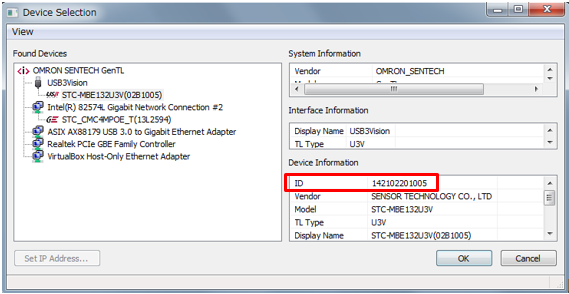
How to check the Camera ID:
Open StViewer and go to the Device Selection screen.
Select the camera.
In the Device Information panel at the bottom right, the field labeled “ID” is the Camera ID.
How to connect using Camera ID:
Once you know the Camera ID of the target camera, you can specify it in the IStInterface::CreateIStDevice() function to connect to that camera.
Example function for connecting via a known Camera ID:
bool CONNECT_TO_TARGET_CAMERA_VIA_CAMERAID(IStSystem * createdSystemPtr, CIStDevicePtr * deviceContainer, GenICam::gcstring tgtCameraID)
{
bool bHit = false;
uint32_t uintInterface = createdSystemPtr->GetInterfaceCount();
for (uint32_t i = 0; i < uintInterface; i++) { IStInterface *pIStInterface(createdSystemPtr->GetIStInterface(i));
try
{
*deviceContainer = pIStInterface->CreateIStDevice(tgtCameraID);
bHit = true;
break;
}
catch (const GenICam::GenericException &e)
{
}
}
return bHit;
}
Contact
For any questions about our products and services,
including specifications and technical support, please feel free to contact us.
Headquarters,
Sales Department+81 46236-6660
Newsletter Subscription
Stay up-to-date with our latest news, including new product releases,
information on discontinued products, and upcoming trade shows.