


FAQ Categories
How can I configure jumbo packet settings on a network card?
Jumbo packet settings can be configured either from Device Manager or by using the StNICConfig software included in the Sentech SDK.
The following describes how to configure jumbo packets using StNICConfig:
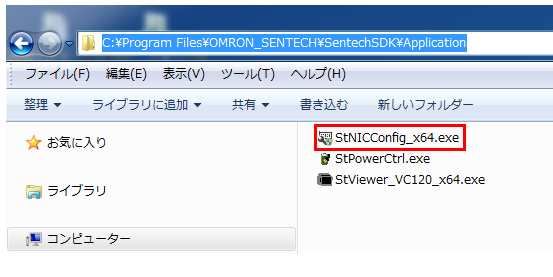
1. Start StNICConfig_x64.exe located in the folder:
C:\Program Files\OMRON_SENTECH\v(version)\SentechSDK\Application
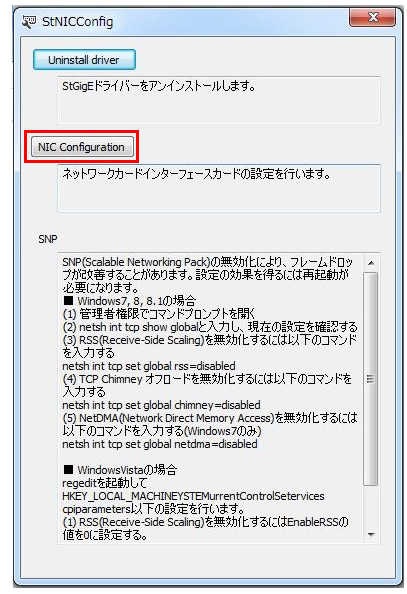
2. Select NIC Configuration.
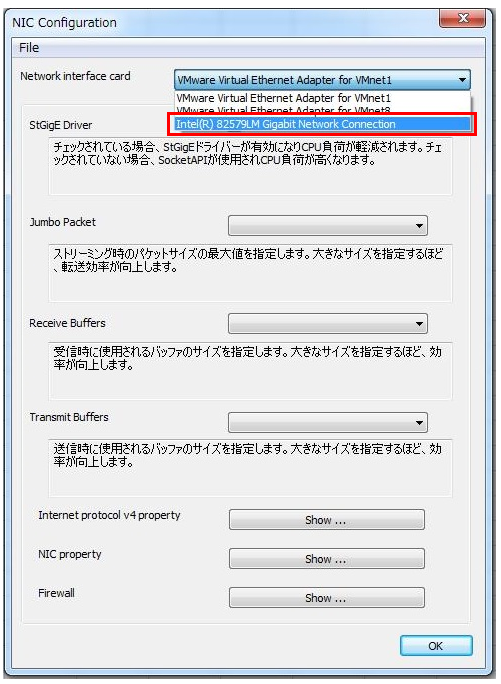
3. Click the combo box for the network interface card to which the camera is connected, and select the network adapter that supports jumbo frames.
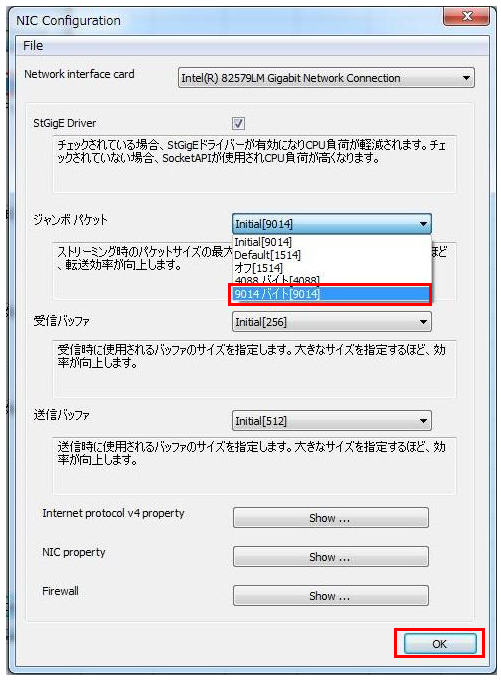
4. Click the combo box for Jumbo Packet, select “9014 Bytes [9014]”, and then click OK.
5. After changing the settings, disconnect and reconnect the power cable to restart the camera.
6. After restarting the camera, launch StViewer and check the frame rate and transfer data volume.
Contact
For any questions about our products and services,
including specifications and technical support, please feel free to contact us.
Headquarters,
Sales Department+81 46236-6660
Newsletter Subscription
Stay up-to-date with our latest news, including new product releases,
information on discontinued products, and upcoming trade shows.