


CoaXPress Line Scan Cameras
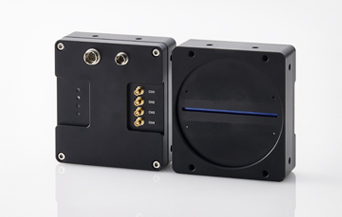
- Overview
- A CoaXPress line scan camera series equipped with 8K / 16K CMOS sensors.
- Features
- Trigger control can be performed using encoder signals from the system.
A CoaXPress frame grabber (image capture board) is required to use the CoaXPress cameras.
Product Lineup
| Select | Product Model |
Color / Monochrome |
Resolutions | Effective Pixels |
Line Rate | Lens Mount |
Dimensions (mm) |
Image Sensor |
Optical Size |
Cell Size |
Shutter Type |
Interface |
|---|---|---|---|---|---|---|---|---|---|---|---|---|
| STC-GLB8KU7CXP124-M72 | Monochrome | 8k Single | 8,192 (H) x 1 (V) | 240 kHz | M72 Mount | 76 (W) x 92 (H) x 53 (D) mm | Gpixel GL7008 | Others | 7.0 (H) x 7.0 (V) µm | Global Shutter | CoaXPress (CXP-12) | |
| STC-GLB16KU35DCXP124-M72 | Monochrome | 16k Single | 16,384 (H) x 2 (V) | 120 kHz | M72 Mount | 76 (W) x 92 (H) x 53 (D) mm | Gpixel GL3516 | Others | 3.5 (H) x 3.5 (V) µm | Global Shutter | CoaXPress (CXP-12) | |
| STC-GLB16KU5CXP124-M95 | Monochrome | 16k Single | 16,384 (H) x 1 (V) | 261 kHz | M95 Mount | 99 (W) x 110 (H) x 38 (D) mm | Gpixel GL5016 | Others | 5.0 (H) x 5.0 (V) µm | Global Shutter | CoaXPress (CXP-12) | |
| STC-GLC8KU7CXP124-M72 | Color | 8k Tri-line | 8,192 (H) x 3 (R, G, B) | 80 kHz | M72 Mount | 76 (W) x 92 (H) x 53 (D) mm | Gpixel GL7008 | Others | 7.0 (H) x 7.0 (V) µm | Global Shutter | CoaXPress (CXP-12) | |
| STC-GLC16KU35DCXP124-M72 | Color | 16k Dual | 16,384 (H) x 2 (V) | 60 kHz | M72 Mount | 76 (W) x 92 (H) x 53 (D) mm | Gpixel GL3516 | Others | 3.5 (H) x 3.5 (V) µm | Global Shutter | CoaXPress (CXP-12) | |
| STC-GLC16KU5CXP124-M95 | Color | 16k Tri-line | 16,384 (H) x 3 (V) | 91 kHz | M95 Mount | 99 (W) x 110 (H) x 38 (D) mm | Gpixel GL5016 | Others | 5.0 (H) x 5.0 (V) µm | Global Shutter | CoaXPress (CXP-12) |
M95 mount: M95 P=1.0mm FB=9.4mm
Accessories
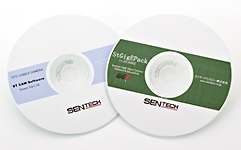
Software required to use the product.
You can acquire images from camera and modify some camera settings using the software package provided by the CoaXPress frame grabber manufacturer.
In addition, by using the software driver provided by the CoaXPress frame grabber manufacturer, you can acquire camera images and change camera settings through the Sentech SDK (StViewer) software.
(For information on tested board manufacturers and compatible software packages, please feel free to contact us.)
* Please download Sentech SDK from the download page.
Related Documents Downloads
Documents Download Information
This page uses cookies* to enhance user convenience.
When you download materials for the first time, please fill out the required fields in the application form below.
From the second time onward, if you access from the same browser, the input will be skipped and you can download the materials immediately.
The personal information you provide through the form will be used only for the purpose of operating this service, such as providing information about our services.
Your information will be managed securely, so please use this service with confidence.
Product datasheets and software Download
General Catalog Download
Product in Line Scan Cameras
Product Categories







Contact
For any questions about our products and services,
including specifications and technical support, please feel free to contact us.
Headquarters,
Sales Department+81 46236-6660
Newsletter Subscription
Stay up-to-date with our latest news, including new product releases,
information on discontinued products, and upcoming trade shows.